

8 Best AI-Powered CAD Tools in 2026
The 8 AI-powered CAD tools actually worth evaluating in 2026 - what each one does, what it doesn't, and how to build a stack that fits your workflow.
8 Best AI-Powered CAD Tools in 2026
The 8 AI-powered CAD tools actually worth evaluating in 2026 - what each one does, what it doesn't, and how to build a stack that fits your workflow.
Liran Silbermann, for Leo AI Marketing
Introduction
The honest reality: most of the "AI for engineering" tools that flooded the market over the last two years don't actually understand mechanical engineering. They understand text. They understand images. A few of them have been trained on engineering textbooks scraped from the internet. But hand them a STEP file and ask them to find the threaded features in an assembly, and they stare back blankly.
2026 is different - not because AI got smarter overnight, but because the tools worth using have gotten significantly more specific. The gap between a general-purpose LLM trying to help an ME and a purpose-built engineering AI is now wide enough to matter in a design review.
This post covers the eight tools that are actually showing up in real engineering workflows - what each one does, what it doesn't do, and where it fits in the stack. No tool covers everything. The teams getting the most out of AI are the ones who've stopped looking for one solution and started building a stack.
Introduction
The honest reality: most of the "AI for engineering" tools that flooded the market over the last two years don't actually understand mechanical engineering. They understand text. They understand images. A few of them have been trained on engineering textbooks scraped from the internet. But hand them a STEP file and ask them to find the threaded features in an assembly, and they stare back blankly.
2026 is different - not because AI got smarter overnight, but because the tools worth using have gotten significantly more specific. The gap between a general-purpose LLM trying to help an ME and a purpose-built engineering AI is now wide enough to matter in a design review.
This post covers the eight tools that are actually showing up in real engineering workflows - what each one does, what it doesn't do, and where it fits in the stack. No tool covers everything. The teams getting the most out of AI are the ones who've stopped looking for one solution and started building a stack.
What to Look for Before You Evaluate Anything
Before running a tool comparison, three questions worth asking:
Can it read your actual data? Not PDFs of screenshots of your CAD. The actual geometry. B-rep, feature tree, assembly structure. If the answer is no, it's a text tool wearing an engineering hat.
Does it cite its sources? In a regulated environment — aerospace, defense, medical devices — an answer without a traceable source is no better than a guess. If the tool can't tell you where its answer came from, down to the page and paragraph, your quality team won't accept it.
What happens to your IP? If the tool trains its model on your data, your proprietary designs — tolerances, materials, assembly sequences — are potentially accessible to competitors. This is not hypothetical. It's in the terms of service of several major general-purpose AI tools.
With those filters in place, here's the 2026 landscape:
What to Look for Before You Evaluate Anything
Before running a tool comparison, three questions worth asking:
Can it read your actual data? Not PDFs of screenshots of your CAD. The actual geometry. B-rep, feature tree, assembly structure. If the answer is no, it's a text tool wearing an engineering hat.
Does it cite its sources? In a regulated environment — aerospace, defense, medical devices — an answer without a traceable source is no better than a guess. If the tool can't tell you where its answer came from, down to the page and paragraph, your quality team won't accept it.
What happens to your IP? If the tool trains its model on your data, your proprietary designs — tolerances, materials, assembly sequences — are potentially accessible to competitors. This is not hypothetical. It's in the terms of service of several major general-purpose AI tools.
With those filters in place, here's the 2026 landscape:
The 8 Tools
1. Leo AI
Leo is built on a patented Large Mechanical Model (LMM) - the first AI model with granted US patents for natively reading B-rep CAD geometry. It doesn't take screenshots of your models or convert them to text descriptions. It reads the geometry directly: features, dimensions, mates, tolerances, relationships.
In practice, this means you can select a bracket in a SOLIDWORKS assembly and ask Leo to find every geometrically similar part in your PDM, not by name, not by part number, but by shape. You can ask why a certain tolerance was chosen on a part from 2009 and Leo will surface the calculation document or the design note that justified it, with a clickable citation.
Leo also serves as a knowledge layer across your entire org, integrating with PDM, PLM, ERP, SharePoint, and local network drives. It indexes your CAD, PDFs, scanned drawings, and legacy documents (including multilingual ones) and keeps them synced daily without manual uploads.
Customer reference: At HP Indigo, across a team of 150+ engineers on V12 platform development, a query that previously took two days of searching returned a verified, source-cited answer in two minutes. VP of Strategic Development Yoni Nir rated it 9.5/10.
Security: SOC 2 Type II certified, GDPR compliant, pen-test approved. No AI is trained on your data.
Best fit for: Engineering orgs with years of accumulated PDM/PLM data, teams with retiring senior engineers, organizations dealing with part proliferation and BOM cost pressure.
Not a fit for: Teams with no existing design data to index - Leo's value compounds with the size and quality of your knowledge base.
2. Autodesk Generative Design (Fusion)
Generative Design explores topology-optimized geometry candidates from a constraint set - you define the loads, materials, and manufacturing methods, and the tool generates geometry that no human would model manually. Useful for lightweighting structural components, particularly when additive or casting is in play.
It does not help you find an existing part, answer a technical question from your PLM, or inspect a design against internal standards. It's a concept exploration tool, not a knowledge tool.
3. SOLIDWORKS AURA (3DEXPERIENCE Platform)
AURA is a conversational assistant embedded in the 3DEXPERIENCE environment. It can help navigate SOLIDWORKS commands, suggest constraints, automate repetitive modeling steps, and answer questions about SOLIDWORKS-native workflows.
It does not know your org's design history, your internal guidelines, or your specific product line. It knows SOLIDWORKS.
4. CoLab AutoReview
CoLab's AutoReview is an AI agent that runs structured checks on CAD models and 2D drawings - reading native geometry, cross-referencing views, flagging DFM issues, and applying standards rules. It builds an AI knowledge graph from your team's design review history, linking models to the conversational feedback that surrounded them.
Strong for: formal review workflows, distributed teams, and capturing lessons learned at the point of review.
5. Siemens NX AI
NX's AI features focus on pattern recognition across design history - identifying recurring features, anticipating modeling steps based on individual user patterns, and automating design rule enforcement. Deep integration with Siemens' manufacturing execution stack makes it relevant for teams already committed to the NX/Teamcenter ecosystem.
6. PTC Creo Generative Design Extension (GDX)
GDX runs optimization in the cloud and returns editable B-Rep geometry directly into your Creo environment - no messy conversion from mesh to solid. Creo's parametric foundation makes this a relatively natural fit. Works within the existing Creo/Windchill stack.
7. ANSYS Discovery
Discovery provides real-time simulation feedback as you model - fluid flow, structural stress, thermal - without the overnight solve times of traditional FEA/CFD. Useful for rapid design iteration and catching gross structural problems early. Doesn't replace full-fidelity simulation for final validation, but significantly reduces the number of design changes that survive to that stage.

The 8 Tools
1. Leo AI
Leo is built on a patented Large Mechanical Model (LMM) - the first AI model with granted US patents for natively reading B-rep CAD geometry. It doesn't take screenshots of your models or convert them to text descriptions. It reads the geometry directly: features, dimensions, mates, tolerances, relationships.
In practice, this means you can select a bracket in a SOLIDWORKS assembly and ask Leo to find every geometrically similar part in your PDM, not by name, not by part number, but by shape. You can ask why a certain tolerance was chosen on a part from 2009 and Leo will surface the calculation document or the design note that justified it, with a clickable citation.
Leo also serves as a knowledge layer across your entire org, integrating with PDM, PLM, ERP, SharePoint, and local network drives. It indexes your CAD, PDFs, scanned drawings, and legacy documents (including multilingual ones) and keeps them synced daily without manual uploads.
Customer reference: At HP Indigo, across a team of 150+ engineers on V12 platform development, a query that previously took two days of searching returned a verified, source-cited answer in two minutes. VP of Strategic Development Yoni Nir rated it 9.5/10.
Security: SOC 2 Type II certified, GDPR compliant, pen-test approved. No AI is trained on your data.
Best fit for: Engineering orgs with years of accumulated PDM/PLM data, teams with retiring senior engineers, organizations dealing with part proliferation and BOM cost pressure.
Not a fit for: Teams with no existing design data to index - Leo's value compounds with the size and quality of your knowledge base.
2. Autodesk Generative Design (Fusion)
Generative Design explores topology-optimized geometry candidates from a constraint set - you define the loads, materials, and manufacturing methods, and the tool generates geometry that no human would model manually. Useful for lightweighting structural components, particularly when additive or casting is in play.
It does not help you find an existing part, answer a technical question from your PLM, or inspect a design against internal standards. It's a concept exploration tool, not a knowledge tool.
3. SOLIDWORKS AURA (3DEXPERIENCE Platform)
AURA is a conversational assistant embedded in the 3DEXPERIENCE environment. It can help navigate SOLIDWORKS commands, suggest constraints, automate repetitive modeling steps, and answer questions about SOLIDWORKS-native workflows.
It does not know your org's design history, your internal guidelines, or your specific product line. It knows SOLIDWORKS.
4. CoLab AutoReview
CoLab's AutoReview is an AI agent that runs structured checks on CAD models and 2D drawings - reading native geometry, cross-referencing views, flagging DFM issues, and applying standards rules. It builds an AI knowledge graph from your team's design review history, linking models to the conversational feedback that surrounded them.
Strong for: formal review workflows, distributed teams, and capturing lessons learned at the point of review.
5. Siemens NX AI
NX's AI features focus on pattern recognition across design history - identifying recurring features, anticipating modeling steps based on individual user patterns, and automating design rule enforcement. Deep integration with Siemens' manufacturing execution stack makes it relevant for teams already committed to the NX/Teamcenter ecosystem.
6. PTC Creo Generative Design Extension (GDX)
GDX runs optimization in the cloud and returns editable B-Rep geometry directly into your Creo environment - no messy conversion from mesh to solid. Creo's parametric foundation makes this a relatively natural fit. Works within the existing Creo/Windchill stack.
7. ANSYS Discovery
Discovery provides real-time simulation feedback as you model - fluid flow, structural stress, thermal - without the overnight solve times of traditional FEA/CFD. Useful for rapid design iteration and catching gross structural problems early. Doesn't replace full-fidelity simulation for final validation, but significantly reduces the number of design changes that survive to that stage.
What This Looks Like in Practice
Scenario: New part design, senior engineer is on vacation
Without an AI stack:
Engineer designs a new bracket
Part with nearly identical geometry already exists in PDM — unknown to this engineer
Design proceeds, new part number created
Manufacturing tooling quote received
Senior engineer returns, recognizes the duplicate
ECO initiated, timeline delayed
With Leo AI in the stack:
Engineer selects bracket geometry in CAD, runs Leo's part search
Leo returns three geometrically similar existing parts, ranked by commonality and dimensional match
Engineer selects validated alternative
No new part number, no new tooling, no ECO
Then, before release:
CoLab AutoReview catches a DFM issue on the mounting boss — wall thickness marginal for the casting process
Fix made in 20 minutes before the drawing leaves the department
The AI tools work best as layers, not replacements for each other.
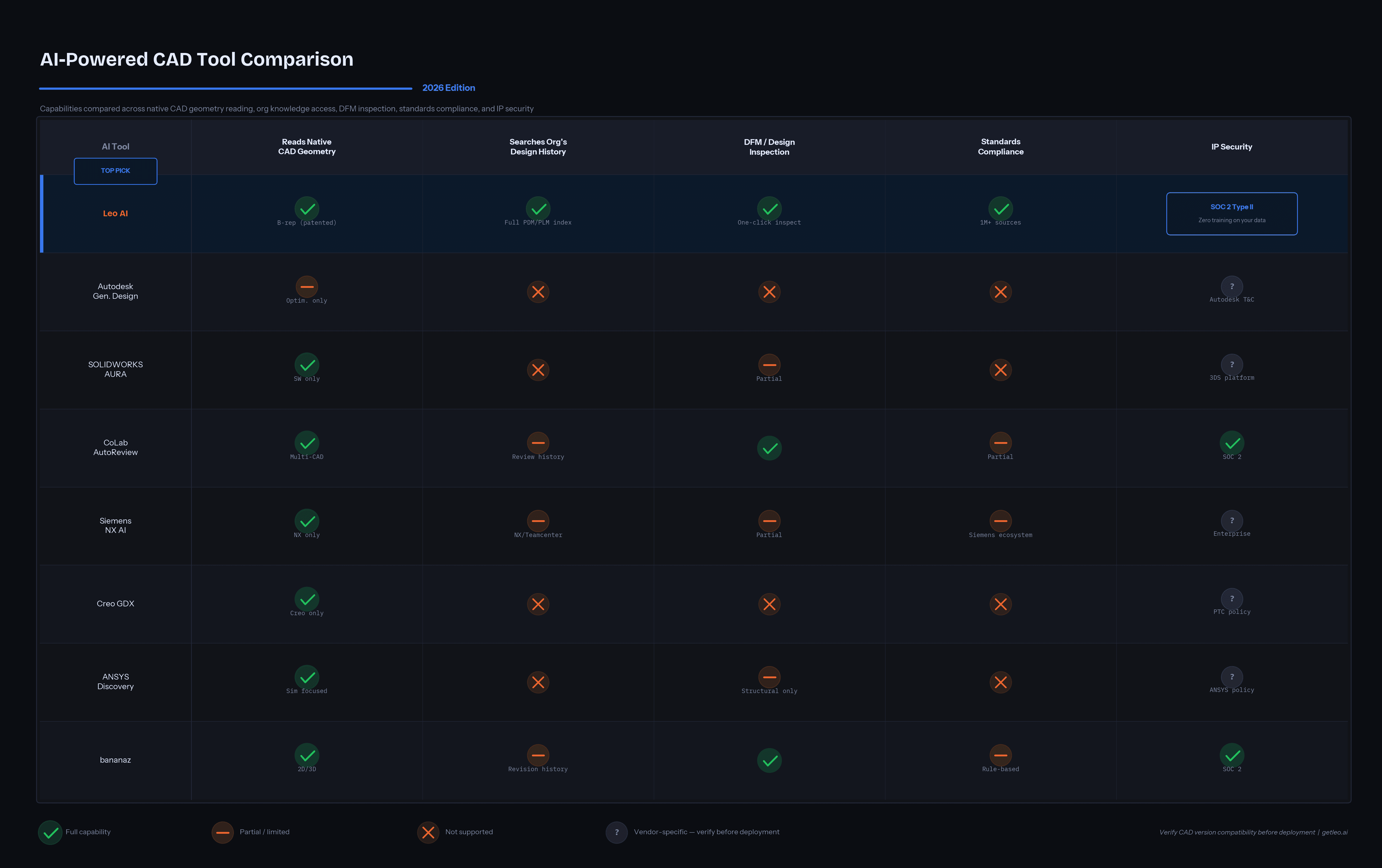
Note: "Reads native CAD geometry" means the tool processes actual geometry data, not images or text descriptions of models. Capability depth varies significantly by CAD platform and deployment configuration. Verify compatibility with your specific CAD version and PDM setup before committing to any evaluation.
What This Looks Like in Practice
Scenario: New part design, senior engineer is on vacation
Without an AI stack:
Engineer designs a new bracket
Part with nearly identical geometry already exists in PDM — unknown to this engineer
Design proceeds, new part number created
Manufacturing tooling quote received
Senior engineer returns, recognizes the duplicate
ECO initiated, timeline delayed
With Leo AI in the stack:
Engineer selects bracket geometry in CAD, runs Leo's part search
Leo returns three geometrically similar existing parts, ranked by commonality and dimensional match
Engineer selects validated alternative
No new part number, no new tooling, no ECO
Then, before release:
CoLab AutoReview catches a DFM issue on the mounting boss — wall thickness marginal for the casting process
Fix made in 20 minutes before the drawing leaves the department
The AI tools work best as layers, not replacements for each other.
Note: "Reads native CAD geometry" means the tool processes actual geometry data, not images or text descriptions of models. Capability depth varies significantly by CAD platform and deployment configuration. Verify compatibility with your specific CAD version and PDM setup before committing to any evaluation.
The Question Nobody Asks Before Evaluating
Most teams spend evaluation time on features. The question that actually determines whether a tool sticks is: what happens when it gives a wrong answer?
For a tool to be trustworthy in an engineering context, wrong answers need to be visible. That means source citations you can click and verify, calculation code you can trace, and an explicit "I don't know" when the evidence isn't there — not a confident hallucination.
This is not a minor point. An incorrect material specification acted on without verification is an ECO at best and a field failure at worst. Any tool that can't show its work doesn't belong in a design workflow.
See Leo AI in Action
Request a demo using your actual SOLIDWORKS environment and design history.
See Leo AI in Action
Request a demo using your actual SOLIDWORKS environment and design history.
Can any of these tools read my SOLIDWORKS assemblies directly?
Do these tools require our engineers to change their CAD workflow?
What if our PDM is a mess — outdated parts, inconsistent naming, multiple file versions?
Glossary
B-rep (Boundary Representation): The mathematical format used to define solid geometry in CAD — faces, edges, vertices. The native format of all major parametric CAD systems.
LMM: Large Mechanical Model — Leo AI's patented AI architecture for reading engineering geometry natively.
PDM: Product Data Management
PLM: Product Lifecycle Management
DFM: Design for Manufacturability
ECO: Engineering Change Order
BOM: Bill of Materials
FEA/CFD: Finite Element Analysis / Computational Fluid Dynamics
Glossary
B-rep (Boundary Representation): The mathematical format used to define solid geometry in CAD — faces, edges, vertices. The native format of all major parametric CAD systems.
LMM: Large Mechanical Model — Leo AI's patented AI architecture for reading engineering geometry natively.
PDM: Product Data Management
PLM: Product Lifecycle Management
DFM: Design for Manufacturability
ECO: Engineering Change Order
BOM: Bill of Materials
FEA/CFD: Finite Element Analysis / Computational Fluid Dynamics
Recommended
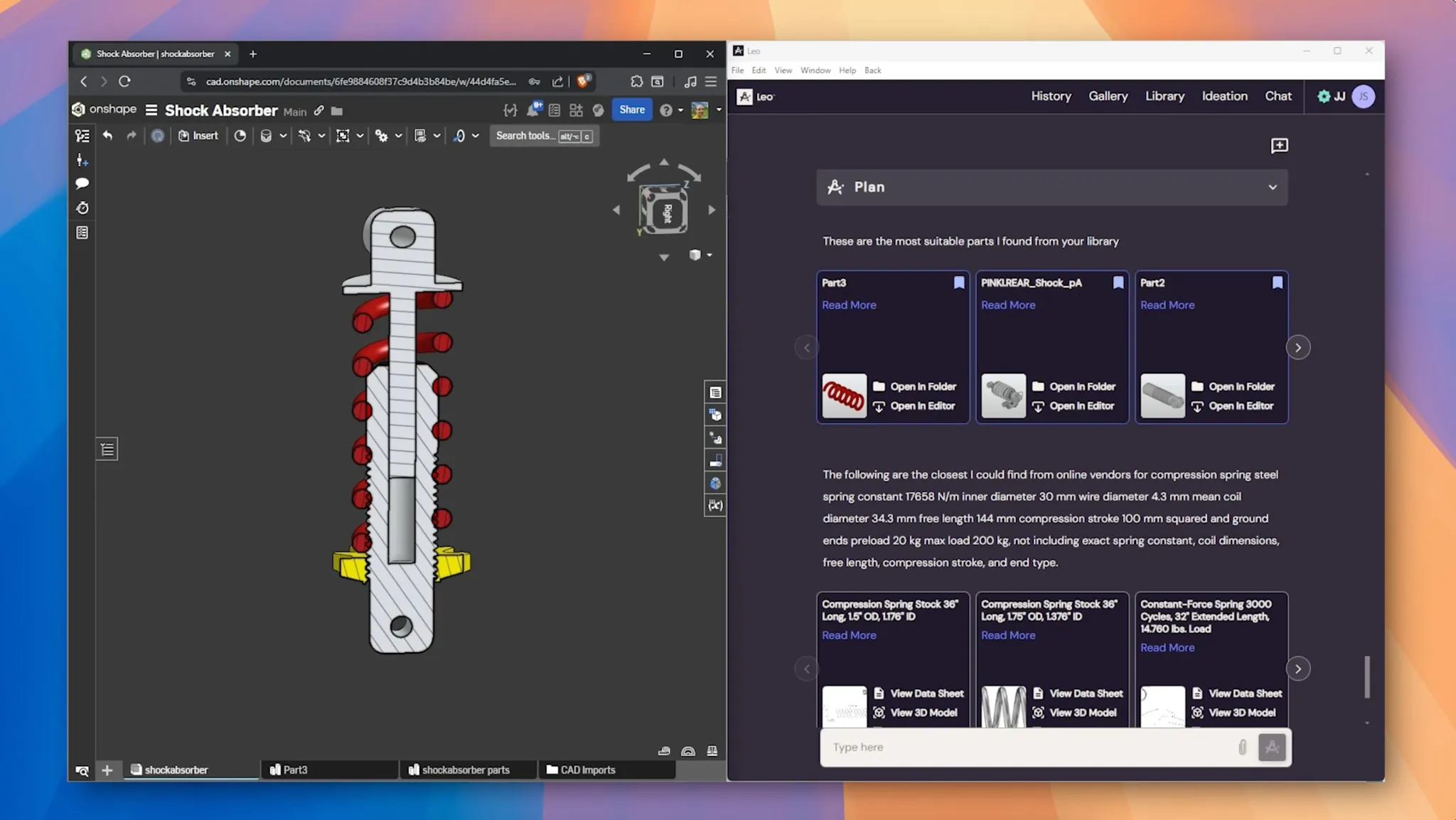
Leo AI Update: Find Parts in Minutes with Plain Language!

The Vision of Leo AI + BOM + Product Memory - The Future of Engineering Workflows

Leo AI Secures Second Patent for CAD-Aware Assembly Design - Here’s What It Means for Engineers

Leo AI raises $9.7M to build the world’s first AI for Mechanical Engineering
Subscribe to our engineering newsletter
Be the first to know about Leo's newest capabilities and get practical tips to boost your engineering.
Need help? Join the Leo AI Community
Connect with other engineers, get answers from our team, and request features.

#1 New Software
Globally
All Industries
#12 AI Tool
Worldwide
G2 2026


© 2026 Leo AI, Inc.
Subscribe to our engineering newsletter
Be the first to know about Leo's newest capabilities and get practical tips to boost your engineering.
Need help? Join the Leo AI Community
Connect with other engineers, get answers from our team, and request features.
#1 New Software
Globally
All Industries
#12 AI Tool
Worldwide
G2 2026
© 2026 Leo AI, Inc.
Subscribe to our engineering newsletter
Be the first to know about Leo's newest capabilities and get practical tips to boost your engineering.
Need help? Join the Leo AI Community
Connect with other engineers, get answers from our team, and request features.
#1 New Software
Globally
All Industries
#12 AI Tool
Worldwide
G2 2026
© 2026 Leo AI, Inc.
Subscribe to our engineering newsletter
Be the first to know about Leo's newest capabilities and get practical tips to boost your engineering.
Need help? Join the Leo AI Community
Connect with other engineers, get answers from our team, and request features.
#1 New Software
Globally
All Industries
#12 AI Tool
Worldwide
G2 2026
© 2026 Leo AI, Inc.