

AI for Engineering Productivity
Can AI generate real CAD models? We break down what text-to-CAD tools deliver in 2026, where they fall short, and what engineers should expect.
·
⏱
8 min read

Dr. Maor Farid
Maor Farid is the Co-Founder and CEO of Leo AI, the first AI platform purpose-built for mechanical engineers. He holds a PhD in Mechanical Engineering and completed postdoctoral research at MIT as a Fulbright fellow. A Forbes 30 Under 30 honoree and former AI researcher and Mechanical Engineer in an elite military intelligence, Maor leads Leo AI's mission to transform how engineering teams design better products faster.
BOTTOM LINE
AI can generate CAD models in 2026, but the gap between a visual demo and a production-ready engineering deliverable remains significant. Most tools produce single-part meshes without parametric history, manufacturing awareness, or compliance validation. For mechanical engineers evaluating these tools, the test is not whether the AI can make a shape. The test is whether the output survives a design review, fits into your existing assembly, uses parts already in your vault, and meets the standards your industry requires.
Leo AI bridges this gap by treating CAD generation as an engineering workflow, not a rendering exercise. It searches existing parts before generating new ones, runs calculations before drawing geometry, and produces full parametric assemblies that engineers can edit natively. The result is output that engineering teams can actually trust, review, and send to manufacturing.
Every few months, a new demo goes viral showing an AI tool generating a 3D model from a text prompt. A user types "design a drone frame" and within seconds a glossy render appears on screen. The comments fill up with engineers asking: can I actually use this in production? The short answer is that AI can generate CAD geometry today, but most tools produce output that would never survive a design review. Single-part renders with no feature tree, no parametric history, and no consideration for how the part gets manufactured. For engineering teams evaluating AI CAD generation capabilities in 2026, the gap between demo and production-ready output is where the real conversation begins.
What "AI Generate CAD Models" Actually Means Today
The phrase "AI generate CAD models" covers a wide spectrum. At one end, you have consumer-facing tools that convert text prompts into mesh-based 3D objects. These are useful for concept visualization, gaming assets, and 3D printing hobbyists. At the other end, you have engineering-grade tools that output parametric solids with full feature trees, editable dimensions, and manufacturing-ready geometry.
Most tools on the market in 2026 sit closer to the first category. They produce visually appealing single-part meshes, but the output is not a real CAD file. There is no sketch history, no constraints, no bill of materials. You cannot open the result in SolidWorks or CATIA and modify a fillet radius or change a hole pattern. For professional mechanical engineers, this distinction matters. A model without a feature tree is a digital sculpture, not an engineering artifact.
The few tools that do produce parametric output tend to focus on simple single-part geometries: brackets, enclosures, basic housings. That covers a narrow slice of real design work. Most engineering projects involve multi-part assemblies with dozens or hundreds of components that must interface precisely with each other and meet specific compliance standards.
IN PRACTICE
What Engineers Are Saying
"Leo found a nature-inspired solution, a concept we would not have thought of, that let us use standard, off-the-shelf parts. No custom manufacturing. No dedicated engineer."
— Chen, Team Lead, ZutaCore
Why Most Text-to-CAD Tools Fall Short for Real Engineering
The core limitation of most text-to-CAD tools is that they treat CAD generation as an image generation problem. They train on visual representations of 3D objects and learn to produce geometry that looks correct. But looking correct and being correct are different things in engineering.
A bracket that looks like it could support a load does not mean it has been analyzed for stress under the actual operating conditions. A housing that visually fits around a PCB does not mean its wall thickness meets the minimum for injection molding at the chosen resin. Real engineering design is not just shape creation. It is a decision chain: material selection based on environment and loading, tolerance stack-up analysis across mating parts, compliance with industry standards like ASME Y14.5 or ISO 2768, and manufacturability validation for the chosen fabrication method.
When an engineer designs an assembly by hand, every dimension has a reason behind it. That reason might be a thermal expansion calculation, a supplier catalog constraint, or a lesson learned from a failed prototype three years ago. Tools that skip this reasoning and jump straight to geometry are solving the wrong problem. They automate the easiest 10% of the work (sketching shapes) while ignoring the hardest 90% (making engineering decisions).
What Engineers Should Actually Look for in AI CAD Tools
The question is not "can AI generate a CAD model?" but "can AI generate a model I would actually trust enough to send to manufacturing?" That bar requires several capabilities that most tools lack.
1. Standards-aware calculations before geometry creation. The tool should reference relevant engineering standards, run load calculations, and validate material choices before producing a single line of geometry.
2. Part reuse from your existing vault. Over 60% of components in a typical assembly already exist somewhere in the organization's PDM system. An AI tool that generates new geometry without first searching for existing parts is increasing your BOM cost, not reducing it.
3. Full parametric feature trees that engineers can edit after generation. If you cannot modify a generated part in your native CAD environment, the output is a dead end.
4. Assembly-level thinking, not just single-part generation. Real products are assemblies. The AI needs to understand interfaces, fastener patterns, clearance requirements, and how components mate with each other.
5. Compliance checking against your project-specific requirements. Depending on your industry, that might mean MIL-STD, ISO 13485, ASME, or internal corporate design guidelines.
Engineers evaluating AI tools should test them on a real assembly from their backlog, not on the vendor's curated demo. The demo will always look impressive. The question is whether the tool survives contact with your actual design constraints.
How Leo AI Approaches CAD Generation Differently
Leo AI takes a fundamentally different approach to the problem. Instead of treating CAD generation as a shape-creation task, Leo treats it as an engineering decision-support workflow that happens to produce geometry at the end.
When you describe a design need to Leo, it does not immediately start generating shapes. It first asks clarifying questions, the kind a senior mechanical engineer would ask: What are the load conditions? What is the operating environment? Are there envelope constraints from adjacent assemblies? This mirrors how experienced engineers actually work. They scope the problem before they open a sketch.
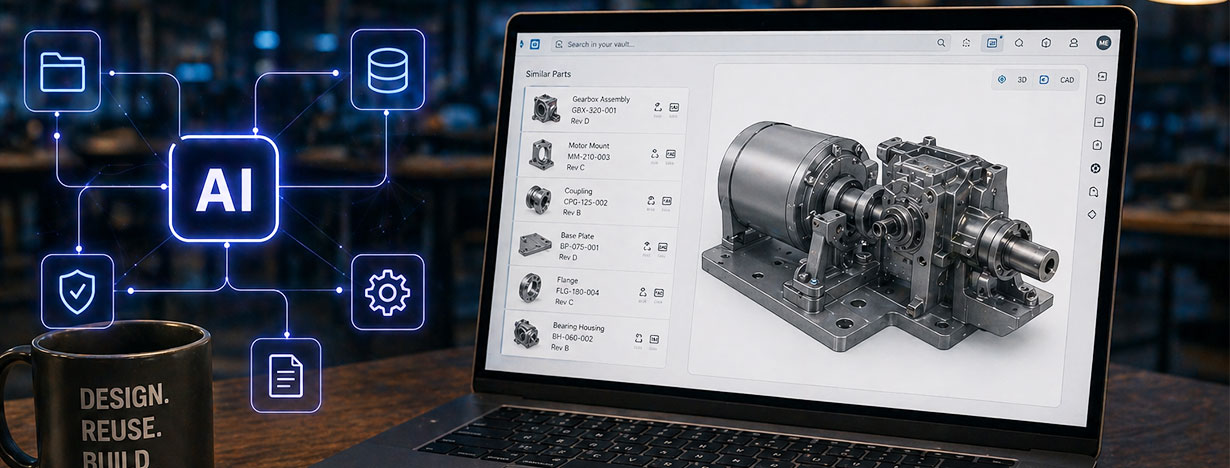
Leo then searches your organization's existing PDM vault for parts that already satisfy the requirements. If a bracket, housing, or fastener assembly already exists and passed production validation two years ago, Leo surfaces it before generating anything new. This alone can reduce BOM costs significantly. Chen, a team lead at ZutaCore, described a project where Leo identified a standard off-the-shelf solution that eliminated custom manufacturing entirely, saving roughly $400 per unit across four components.
Only after exhausting existing options does Leo generate new geometry. And when it does, the output is a full parametric assembly with a complete part tree and feature tree, compatible with SolidWorks, CATIA, Onshape, and Inventor. Every dimension traces back to a calculation or standard. Engineers can open the file in their native CAD environment and edit any parameter, just as if a colleague had created it. That is the difference between generating a 3D object and generating an engineering design.
Keep Reading: Best Text-to-CAD AI Tools in 2026 · Sketch to CAD with AI · AI for Mechanical Engineers Guide · Generative Design ROI and Cost Savings
The Trust Problem: Why Transparency Matters More Than Speed
Speed is the metric most AI CAD tools use in their marketing. "Generate a model in 30 seconds." But speed without transparency creates a trust problem. If an engineer cannot see why a wall thickness is 2.5mm instead of 3mm, they will not sign off on the design. They will re-do the analysis themselves, which eliminates any time savings the tool promised.
This is why engineering-grade AI tools must show their work. When Leo AI recommends a material or selects a fastener size, it cites the specific standard, data sheet, or calculation behind the choice. Engineers can review the reasoning, agree or disagree, and adjust parameters with full visibility into what changes downstream. Professor Michael Beebe, who integrated Leo into his engineering curriculum at North Central State College, described this quality clearly: "You put in a problem, it tells you what calculations it used. That way you can really analyze what the thinking process was."
Transparency also addresses the liability question that every engineering manager asks: if the AI-generated design fails in the field, who is responsible? When the AI shows its reasoning chain, the engineer can validate each decision before committing to manufacturing. The AI becomes a tool that accelerates human judgment, not a black box that replaces it.
FAQ
Try Leo AI
STOP GUESSING IF AI DESIGNS WORK
Leo AI generates full parametric CAD assemblies with traceable calculations and vault-aware part reuse. Try Leo Today at getleo.ai/onboarding
Schedule a Demo →

#1 New AI Software Globally - G2 2026

Enterprise-grade security

Trusted by world-class engineering teams





